TuitionPing vs brightwheel for daycare tuition collection
Choose the tool that fits the work your program needs. TuitionPing schedules tuition reminder texts and records parent replies. brightwheel combines billing and online payments with broader childcare management.
Prepared by TuitionPing · Reviewed October 20, 2026
TuitionPing publishes this comparison. Our screenshots use fictional families in the working public demo. brightwheel details come from its official documentation, linked below.
TuitionPing: scheduled reminder texts
A focused option when your payment method and bookkeeping already work. Families get ordinary texts, can report PAID, and you verify receipt in your records before confirming the payment.
Plans are $9, $19, $39 and $59/month, with different family and location limits. Compare TuitionPing plans.
brightwheel: billing and operations
Consider brightwheel when you want recurring invoices, online payments, autopay, attendance and other program functions in one platform. Its billing tools also include payment notifications.
Request a personalized quote and confirm the payment service fees that apply to your program.
Compare the tuition workflow
Features checked against the sources listed below on October 20, 2026
What you need
TuitionPing
brightwheel
Reminder schedule
Monthly due-day schedules with before-due, due-date and late reminder texts.
Billing notifications for new invoices, due balances and past-due balances.
Your wording
Editable reminder templates in English and Spanish; each family has a preferred language.
Billing reminder notifications use preset wording. Separate private messaging is available.
Parent experience
Ordinary SMS; families do not need a TuitionPing account or app.
Payers can use an account on the web or app. Reminders can use email or SMS, depending on contact details.
Collecting tuition
Keep your existing payment method. TuitionPing does not move money or provide autopay.
Online payment collection and autopay; payments made elsewhere can also be recorded.
Payment confirmation
A PAID reply is parent-reported. You check the money arrived, then confirm receipt.
Payments processed through brightwheel are tracked in billing; outside payments need to be logged and reconciled.
Invoices and other operations
Free standalone invoice, receipt and spreadsheet tools. The reminder subscription does not replace accounting, attendance or enrollment software.
Recurring invoices and broader features including attendance, enrollment and program reporting.
Personalized pricing request. Confirm the subscription quote and any payment service fees.
What a parent's PAID reply actually changes
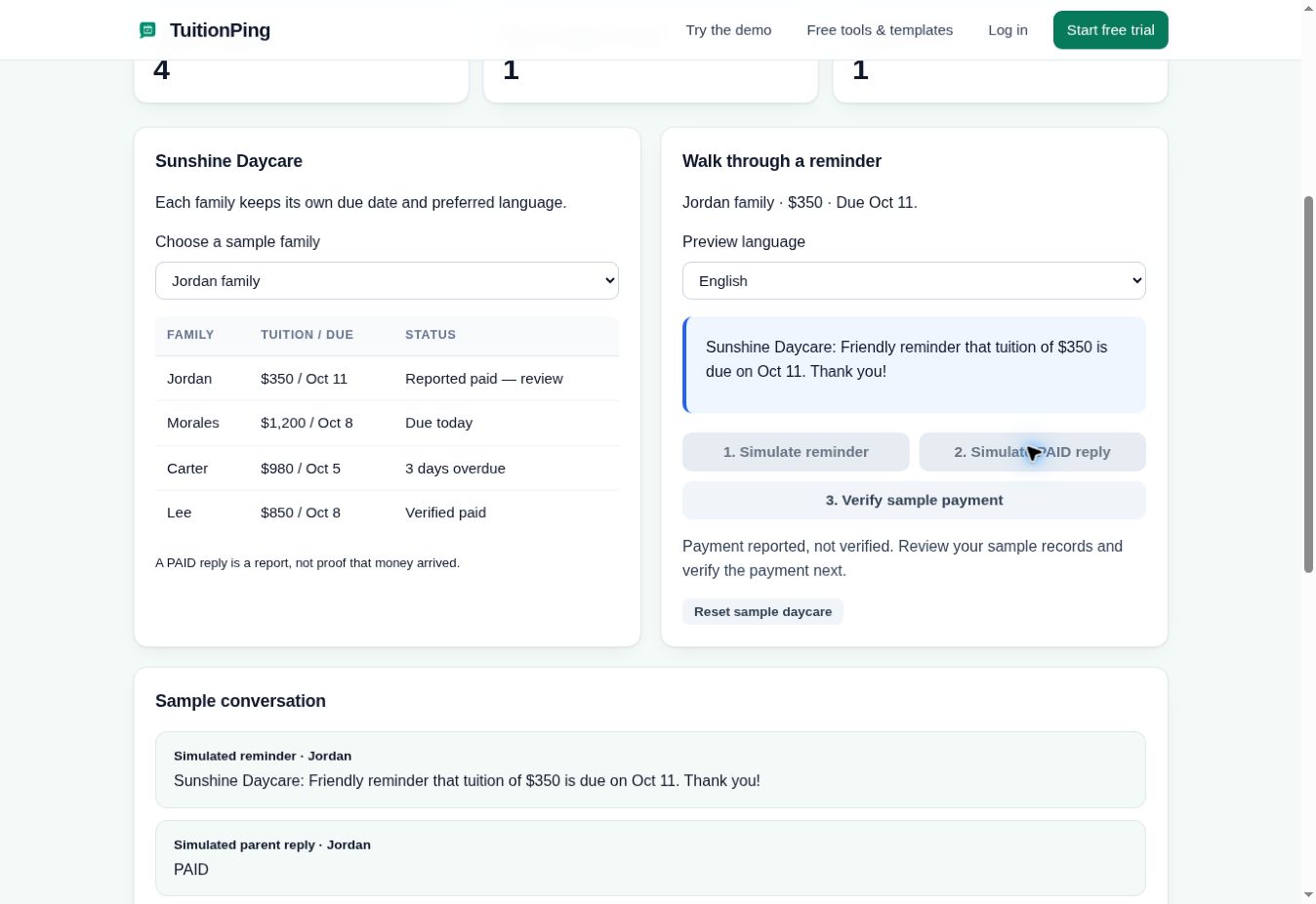
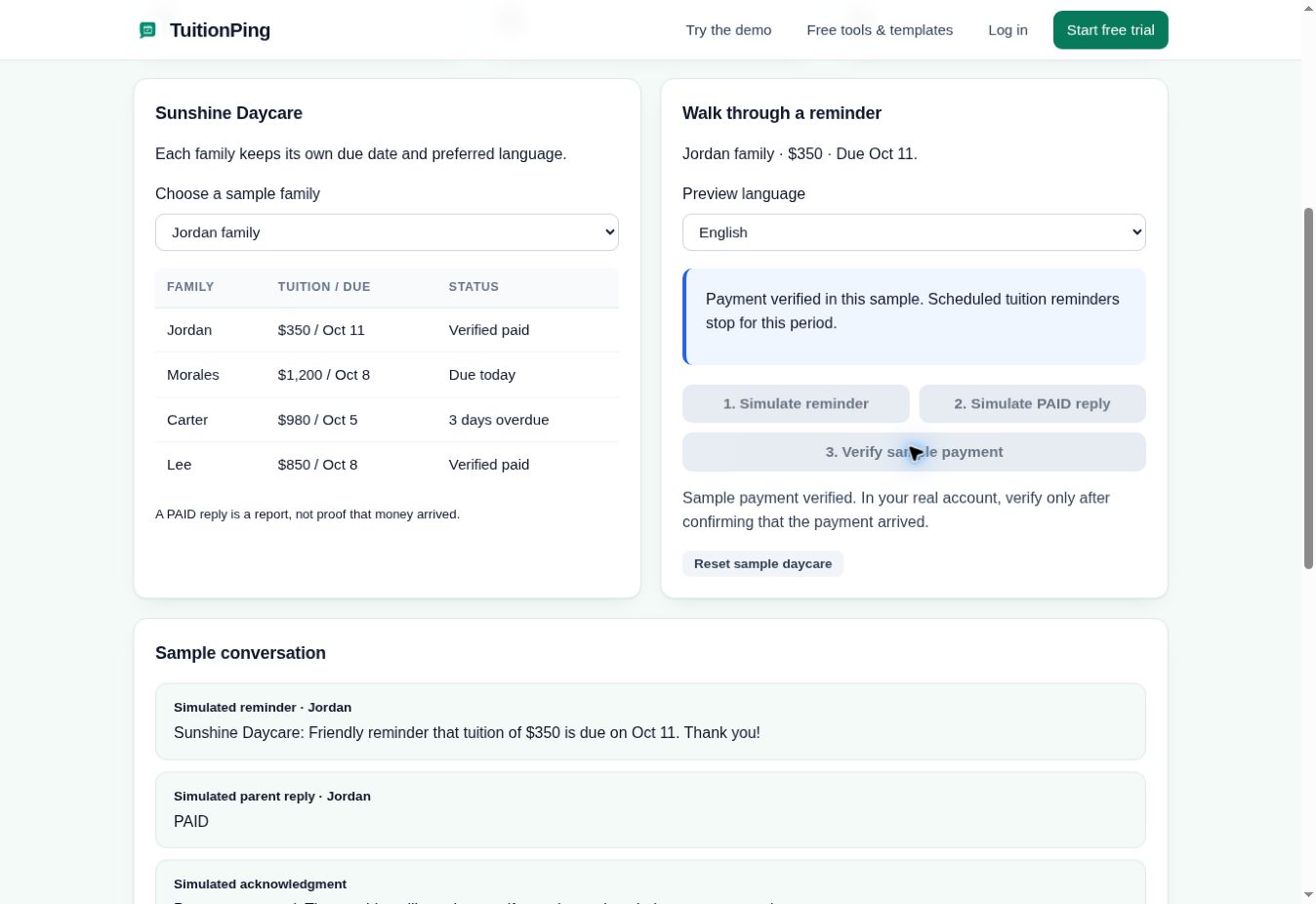
In TuitionPing, a parent reporting payment moves the family into payment review. The provider checks their bank or payment-system records before confirming receipt. A reply alone does not establish that funds arrived.
Real screenshot of the public demo using fictional families. Jordan has reported PAID; the provider still needs to verify receipt. Open the full-size screenshot.See the provider-confirmed viewThe provider has confirmed the sample payment. Jordan now shows Verified paid. Open the full-size screenshot.
The demo sends no messages and processes no payments. In a real account, confirm receipt only after checking your actual payment records.
Which setup fits your program?
You accept checks or transfers and need regular follow-up
Consider TuitionPing if you want scheduled texts while keeping your existing payment method. You remain responsible for recording partial payments, checking balances and confirming receipt.
You want families billed and charged through one platform
Evaluate a billing platform such as brightwheel when recurring invoices and online payment collection are central to your requirements. Ask how its billing cycle, fees and payment records fit your agreement.
Start with the reminder task you need to improve. TuitionPing can fit a program that wants consistent text follow-up while staff continue verifying payments in their existing records.
Can TuitionPing replace brightwheel's online billing?
TuitionPing handles scheduled tuition texts and payment reports. Choose a platform with payment processing if you need invoices, autopay and funds collected through the same system.
Does brightwheel require parents to install an app to pay?
Its payer guide supports both web and app access. An app download is not the only way to use its online billing account.
Does a TuitionPing PAID reply count as verified money?
No. The provider checks the payment and confirms receipt. The screenshots and interactive demo show those as separate steps.
How does the TuitionPing trial work?
There is a 30-day trial. A card is collected at secure checkout, with no charge during the trial. Your chosen plan starts afterward unless you cancel. The fictional demo is available without an account or card.
Comparing more than two options?
See the wider shortlist — Procare, Lillio, Famly, Kangarootime, a reminders-only option and the free route — compared by scope and how pricing works.
Reviewed October 20, 2026 using TuitionPing's current plans and working demo, plus these official brightwheel pages. We have not performed a hands-on brightwheel account test. Confirm current features and terms with each provider.
 TuitionPing